Currency
Toggle Nav

Best Elecrow Portable Monitor for Gaming & World Cup 2026
June 25, 2026
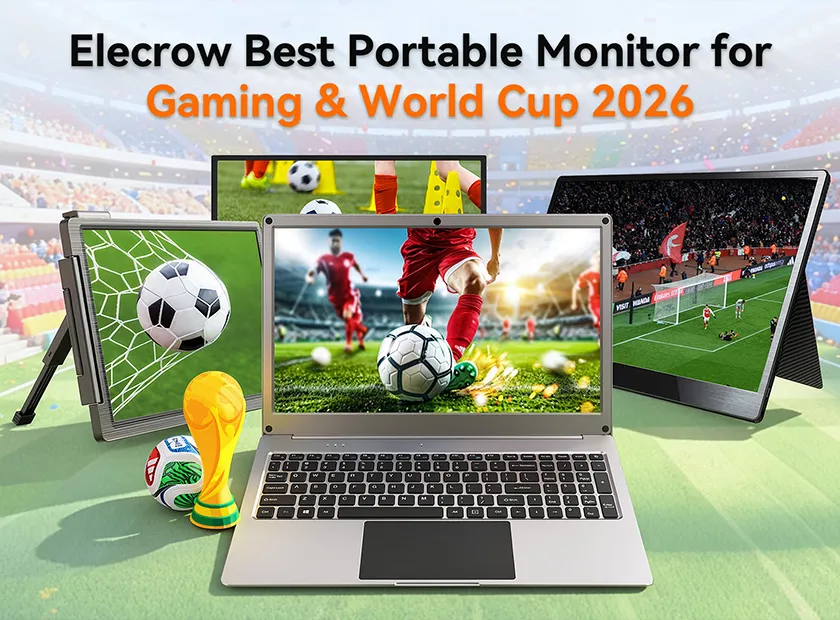
It's 3 AM. Your roommate is asleep. Two football teams just equalized in extra time in a football stadium in Canada. You're watching the FIFA 2026 stream on your phone, hunched over a 6" screen in the dark—and that's fine, until it isn't.
A single USB-C cable changes everything. Clip a portable monitor to your backpack, plug it into your laptop or console, and you've doubled your screen real estate in under 60 seconds. No drivers, no external power brick, no cable spaghetti. Just crisp 1080P IPS and a whole lot more game to stare at.
Whether you're upgrading your gaming rig, setting up a travel workstation, or just want to watch the beautiful game in actual beautiful resolution, this guide breaks down every CrowVi SKU so you can pick the right one without wasting a minute.
Why a Portable Monitor Changes How You Watch FIFA 2026
Let's be honest: your laptop screen was not designed for a penalty shootout. At 6 inches, even a Full HD display feels cramped when you're trying to track 22 players, three referees, and a ball that moves faster than the commentator's mouth.
A portable monitor for gaming fixes that. Pair it with your laptop and you get:
· Dedicated watch party screen — stream the FIFA World Cup 2026 on one display while you keep your bracket tracker open on the other.
· Bigger, brighter pixels — IPS 1080P panels show true colors side-to-side, not washed-out TN garbage.
· Zero setup overhead — single USB-C cable handles video + power. Your dorm room, hotel desk, or coffee table becomes a proper viewing spot in seconds.
· Same screen travels with you — fly to a watch party, unpack, plug in. It weighs less than most hardcover books.
During any major tournament, streaming sites go into overdrive. Having a second screen means you can run the match on fullscreen while simultaneously keeping stats, live commentary, or a fantasy football dashboard front and center. That's not just convenient—it's how serious fans watch football in 2026.
Pro tip: The IPS panel on the CrowVi line maintains color accuracy at wide viewing angles. If you're watching with friends crowded around a desk, everyone gets the same vivid picture—not just the person sitting dead center.
CrowVi 13.3" vs 15.6": Which Portable Screen Fits Your Setup?
The two core CrowVi sizes are built around different use cases. Here's the honest comparison so you don't have to guess:
|
Feature |
CrowVi 13.3" |
CrowVi 15.6" ⭐ Best Value |
|
Screen Size |
13.3 inches |
15.6 inches |
|
Resolution |
1920 × 1080 FHD IPS |
1920 × 1080 FHD IPS |
|
Non-Touch Price |
(CRV13317N) Click the link to see: https://www.elecrow.com/crowvi-13-3inch-portable-usb-c-monitor-non-touchscreen.html |
(CRV15619N) Click the link to see: https://www.elecrow.com/crowvi-15-6inch-portable-usb-c-monitor-non-touchscreen.html |
|
Touchscreen Price |
(CRV13319T) Click the link to see: https://www.elecrow.com/crowvi-13-3inch-portable-usb-c-monitor-touchscreen.html |
(CRV15624T) Click the link to see: https://www.elecrow.com/crowvi-15-6inch-portable-usb-c-monitor-touchscreen.html |
|
Touchscreen Option |
✓ Available |
✓ Available |
|
USB-C Single Cable |
✓ |
✓ |
|
Built-in Speakers |
✓ |
✓ |
|
Ideal For |
Ultra-light travel, backpack carry |
Gaming, watch parties, productivity |
|
Best Match |
MacBook Air, 13" laptops, Switch Lite |
15" laptops, PS4/PS5, Xbox, Switch dock |
The verdict? If you're a frequent flyer or your backpack space is precious, the 13.3" CrowVi slides in alongside a 13" MacBook without adding bulk. But if screen real estate is your priority—and for gaming and football viewing it almost always is—the 15.6" CrowVi is one of the most compelling USB-C portable monitors available at that price point. You get 2.3 more inches of diagonal for just $9 more. That's simple math.
Considering the touchscreen variants? The 15.6" touch at $129 is the sweet spot if you want to tap through menus on a console or swipe through football stats without reaching for a mouse. The 13.3" touch at $124.90 makes sense if portability is non-negotiable but you still want that tactile control.
USB-C Gaming Setup: Plug In and Play in Seconds
The phrase "plug and play" gets thrown around a lot. With the CrowVi lineup, it's not marketing copy—it's literally how it works.
1. Connect one USB-C cable from your device to the monitor.
2. Power + signal travel together. No wall adapter needed for most host devices.
3. Your OS recognizes it instantly. No drivers, no firmware ritual, no restart.
4. Adjust brightness and volume via onboard buttons. That's it.
This matters most in spontaneous gaming scenarios. You don't want to troubleshoot display drivers when the pre-match countdown timer is already running. With any CrowVi USB-C portable monitor, your setup time is measured in seconds, not minutes.
Both the 13.3" and 15.6" models include a mini HDMI port as a fallback, so you're covered with older laptops, Raspberry Pi builds, or devices that output video-only over USB-A with a dongle. The flexibility here is genuinely maker-grade—Elecrow's hardware DNA shows through.
Gaming note: The CrowVi series does not advertise a high-refresh-rate panel (it's 60Hz IPS). For competitive esports, you'd want a dedicated gaming monitor. But for FIFA 2026 streaming, Switch gameplay, indie titles, and everyday productivity? 60Hz IPS at this price-to-quality ratio is the right call.
Compatible with Nintendo Switch, PS4, Xbox & More
One of the most common questions: "Will this actually work with my console?" Short answer: yes, if you have the right cable or adapter.
Nintendo Switch (Docked)
Connect the Switch dock's HDMI out → mini HDMI in on the CrowVi. The monitor needs power via USB-C from a wall adapter or USB port in this setup. Works out of the box with Nintendo's own dock as well as third-party docks with USB-C PD output.
PS4 / PS5
Use the HDMI output on your PlayStation → mini HDMI on the CrowVi (with a standard HDMI to mini HDMI cable). Power the monitor separately via USB-C. Both PS4 and PS5 output 1080P which matches the panel natively—no scaling artifacts.
Xbox One / Series S/X
Same HDMI approach as PlayStation. The Series S actually caps at 1440P for some titles, but outputs clean 1080P for everything else, which is exactly what the CrowVi IPS panel renders best.
MacBook / Windows Laptop
Single USB-C cable handles everything on modern MacBooks (2018+) and Thunderbolt-equipped Windows laptops. The dual screen setup with a laptop is where the CrowVi truly shines—extend your desktop, run a stream fullscreen, keep your Discord or chat on the main panel.
Raspberry Pi / SBC
HDMI output via mini HDMI adapter works perfectly. If you're building a retro gaming cabinet or a tabletop FIFA controller interface, the CrowVi's compact form factor and clean IPS display make it a logical choice.
Check All CrowVi & CrowView Portable Monitors
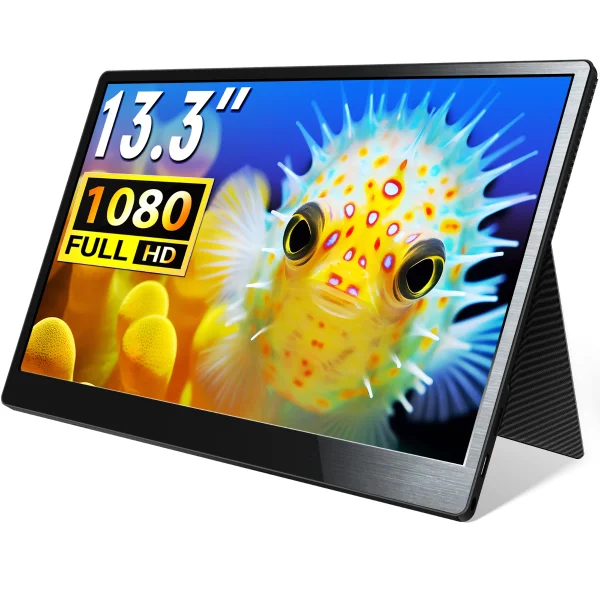
SKU: CRV13317N
CrowVi 13.3" USB-C Portable Monitor (Non-Touch)
1080P IPS · USB-C · Mini HDMI · Built-in Speakers
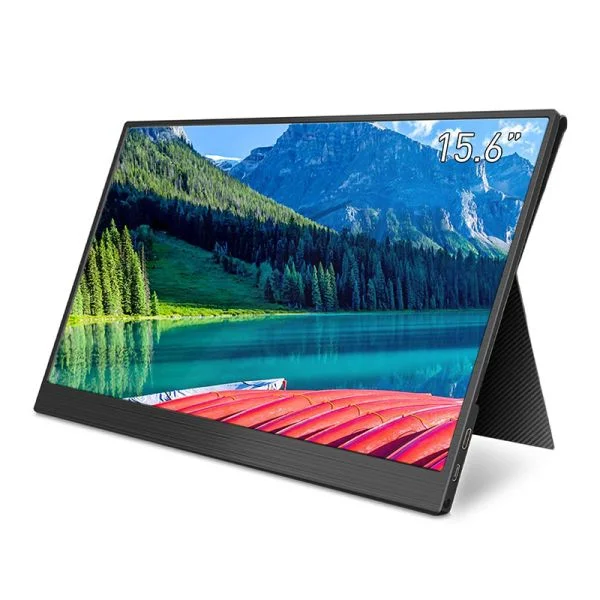
SKU: CRV15619N
https://www.elecrow.com/crowvi-15-6inch-portable-usb-c-monitor-non-touchscreen.html
CrowVi 15.6" USB-C Portable Monitor (Non-Touch)
1080P IPS · USB-C · Mini HDMI · Best-Value Pick
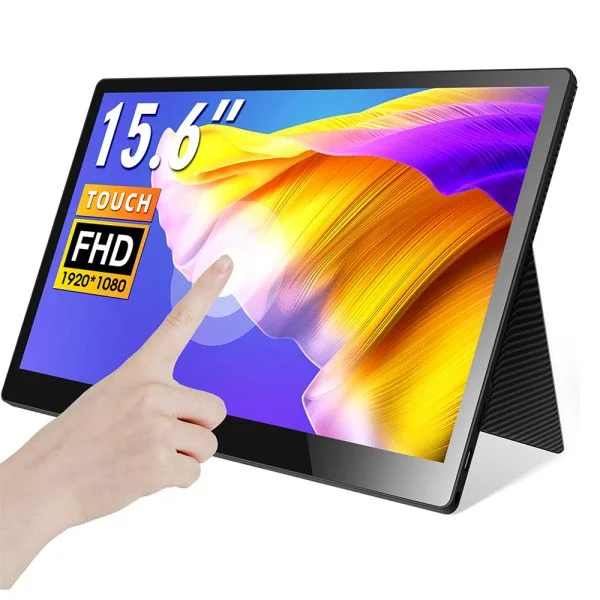
SKU: CRV15624T
https://www.elecrow.com/crowvi-15-6inch-portable-usb-c-monitor-touchscreen.html
CrowVi 15.6" USB-C Portable Monitor (Touchscreen)
1080P IPS · USB-C Touch · Mini HDMI · Console Ready
SKU: CRV00113L
https://www.elecrow.com/crowview-ultimate-14-portable-ultralight-dual-monitor-support-multiple-system-and-13-16-5-laptops.html
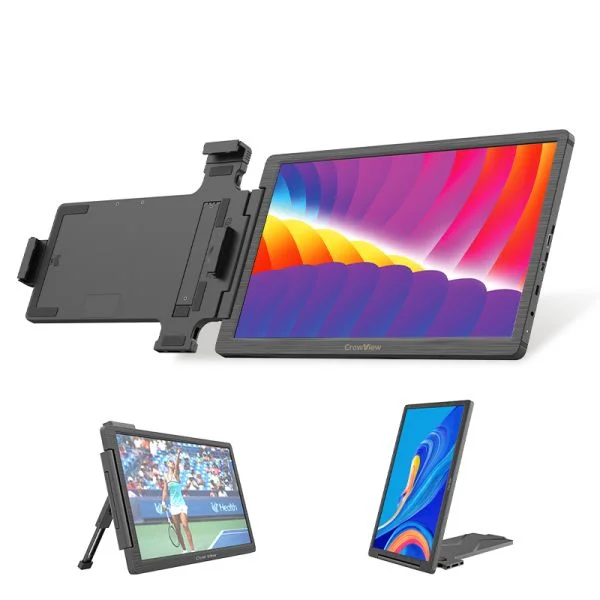
CrowView 14" Laptop Screen Extender
Dual Monitor · Ultralight · Fits 13"–16.5" Laptops
SKU: CRV12214D
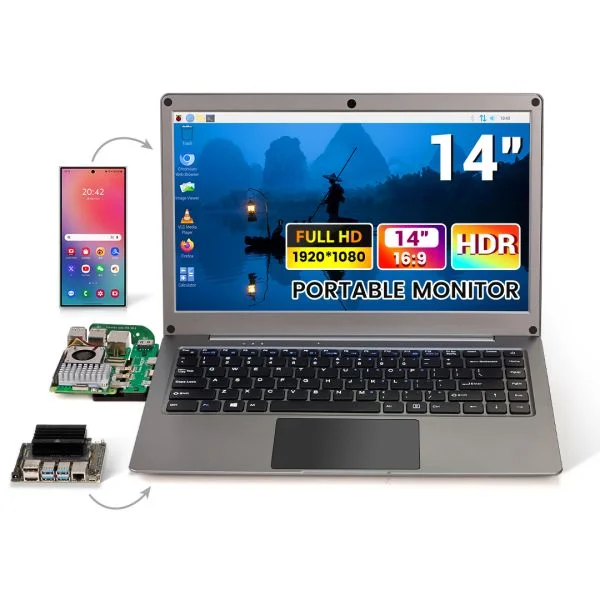
https://www.elecrow.com/crowview-note-14-for-arduino-uno-q-with-camera-kit.html
CrowView Note 14" All-in-One Portable Workstation
Phone-to-Laptop · Full USB-C · SBC / Mini PC Compatible
SKU: DLC44156D
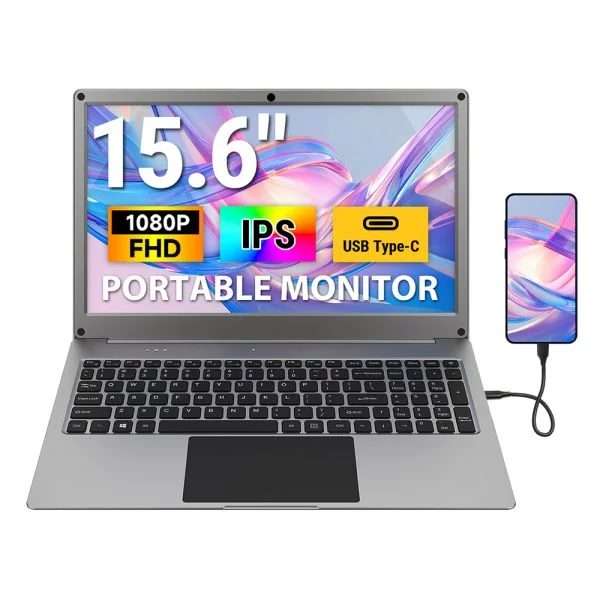
https://www.elecrow.com/crowview-note-15-6-all-in-one-portable-monitor-phone-to-laptop-device.html
CrowView Note 15.6" All-in-One Portable Workstation
15.6" Screen · Phone-to-Laptop · Full USB-C Hub
SKU: DLC05314D
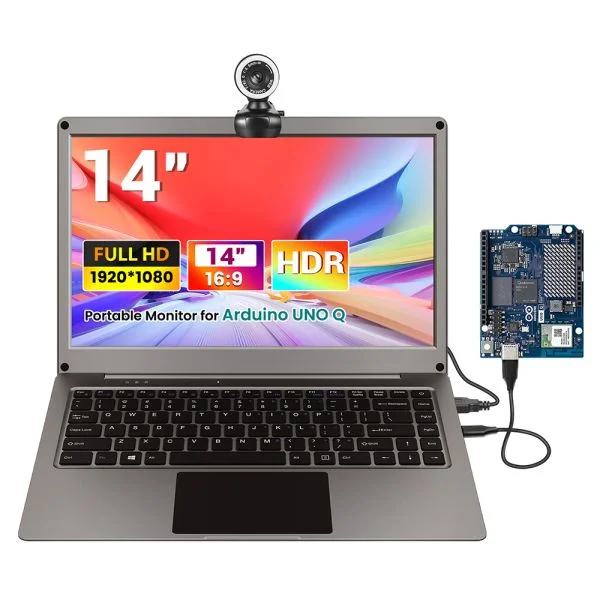
https://www.elecrow.com/crowview-note-14-for-arduino-uno-q-with-camera-kit.html
CrowView Note 14" + Arduino UNO Q Bundle
Maker Bundle · Camera Kit Included · Full Workstation
CrowView Note: The All-in-One Portable Workstation for Gamers
The CrowVi 13.3" and 15.6" handle the straightforward use case beautifully. But the CrowView Note lineup is for users who want to go further.
The CrowView Note series is positioned as a full portable workstation—not just an external display. Here's what separates it from the standard CrowVi monitors:
· Phone-to-Laptop capability: Plug in a compatible Android phone with a full-featured USB-C port, and it acts as your compute unit. The Note provides the display, keyboard (on select models), and USB hub. That's a proper workstation from your pocket.
· Mini PC & SBC compatibility: Running a Raspberry Pi, Jetson Nano, or any other single-board computer? CrowView Note integrates display and I/O in one chassis—maker-grade quality in a portable package.
· Console compatibility: PS4, Xbox, Nintendo Switch via HDMI input. If you're gaming from a console and want to free up your TV, the Note 14" and Note 15.6" handle it cleanly.
· The Arduino Bundle (DLC05314D): This is for the hardware hackers in the room. CrowView Note 14" bundled with an Arduino UNO Q and camera kit—a single box that contains an entire prototyping workstation. At a reasonable price, it's a solid package if you're building something this summer.
For World Cup 2026 use, the CrowView Note 15.6" (DLC44156D) is worth considering if you want a setup that works as both a dedicated stream station and a work productivity extender when the tournament ends.
And yes—the CrowView 14" Laptop Screen Extender (CRV00113L ) deserves a callout here. It's not a standalone monitor—it clips to your existing laptop screen and effectively gives you a laptop with two displays. If you're at a co-working space or hotel and don't want to set up an external stand, this is the cleanest dual screen setup you can carry in a sleeve.
Best Portable Monitor Under $130: Is CrowVi Worth It?
Let's address the elephant in the room: the sub-$130 portable monitor market is flooded with no-name panels that look great in product photos and terrible on your desk. So where does CrowVi land in that landscape?
CrowVi is built by Elecrow—a maker hardware brand with roots in open-source electronics, SBC accessories, and Raspberry Pi displays. That matters. Their display products aren't rushed commodity hardware; they go through the same maker-grade quality discipline as the rest of the Elecrow product line. The IPS panel spec (1920×1080, wide viewing angles, accurate color) is legitimate, not aspirational.
If you buy the 15.6" non-touch (CRV15619N), you're getting:
· Full HD 1080P IPS panel
· Single USB-C cable operation (power + video)
· Mini HDMI fallback for consoles and older devices
· Built-in stereo speakers
· Foldable stand with multiple viewing angles
· No drivers, no software, no subscription
Compared to mainstream portable monitors in this segment (ASUS ZenScreen, ViewSonic VA1655, Lepow Z1), the CrowVi 15.6" at $109 is positioned at or below competitive pricing while matching spec-for-spec on the features that matter most for gaming and media consumption. The touchscreen upgrade to $129 (CRV15624T) is genuinely reasonable—most competitors charge $20–40 more for touch.
Is it worth it? If you're looking for a USB-C portable monitor that handles gaming, streaming, and everyday productivity without demanding a premium price, yes—CrowVi earns its keep. Just keep in mind: it's a 60Hz panel, not a 120Hz+ gaming display. For FIFA 2026 streaming, Switch gaming, RPGs, and productivity workflows? Absolutely the right tool. For competitive FPS gaming where every millisecond matters? You'd want a higher-refresh dedicated gaming monitor.
⚡ Quick ANswer
Q: Which CrowVi is best for gaming?
A: For most gamers, the CrowVi 15.6" (CRV15619N at $109 or CRV15624T touchscreen at $129) offers the best balance of screen real estate and portability. You get a proper 15.6" IPS 1080P display that makes FIFA 2026 match streams, Switch docked gameplay, and PS4/Xbox sessions look genuinely good. If you need ultra-light travel gaming—think commutes, hotel rooms, or backpacking with a gaming laptop—go with the 13.3" CRV13317N at $99.90. It's the lightest option and still delivers the same IPS 1080P quality in a footprint that fits any bag.
Ready to Level Up Your Setup?
The FIFA World Cup 2026 happens once every four years. Your current screen setup doesn't. Whether you're watching 64 matches across three host countries, grinding ranked matches on your Switch, or building a proper travel workstation, there's a CrowVi or CrowView monitor that drops into your life with a single cable.
Right now, Elecrow is running discount promotions across the entire CrowVi lineup—a limited-time offer that aligns with World Cup 2026 season. If you've been on the fence about a portable monitor, this is a reasonable moment to move.
While supplies last on these World Cup 2026 pricing tiers—once tournament season ends, these deals go with it. Don't let the final whistle be the thing that reminds you.
If these screens still don't meet your requirements, feel free to explore more of our other displays 10.1“-15.6” LCD - Display